

I wanted to build a local AI development demo using a mini PC with 64 GB of RAM and a Ryzen 7 GPU. First, I signed up for Spectrum Business Internet. This would let me host an AI app on my own web server with a static IP address. I purchased and installed a 4TB SSD to upgrade the 1 TB SSD already installed.
Server Setup
Next, I installed Ubuntu Server 24.04 on the mini pc. Then I installed Docker, N8N, and Postgres. I also installed Llama 3.2 and the open-source Postgres extension pgvector.
I decided to run the AI application on the server, but host the web pages it uses on a Hostinger server with WordPress.
Support Triage Agent
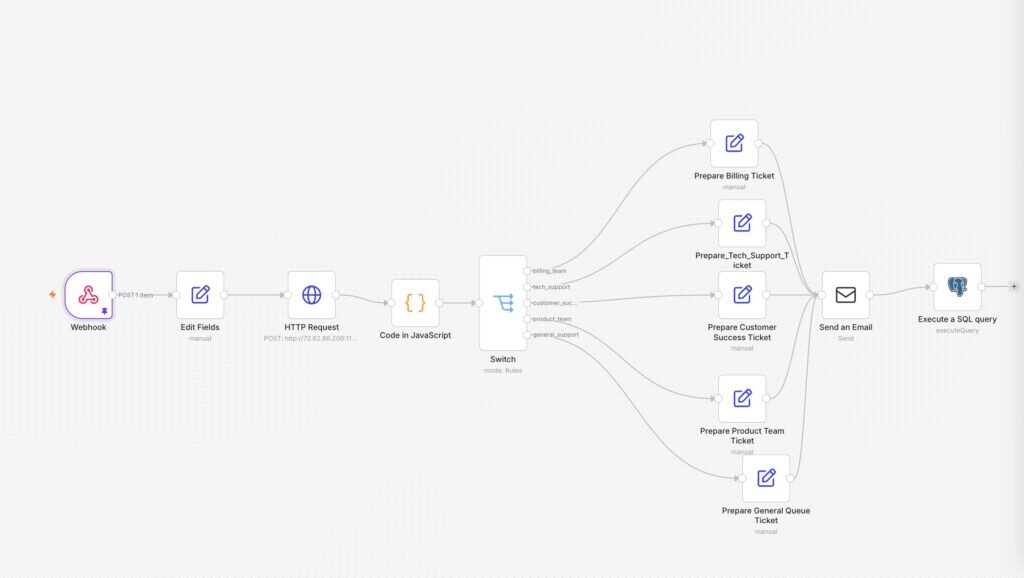
I first created an AI application with N8N for IT support that pre-classifies emails into billing tickets, customer success tickets, tech support tickets, product team tickets, or general support tickets. Based on the email text, the application classifies questions and requests and sends them to the correct teams.
Knowledge Base RAG AI App With Search/Chat
I further created a demo RAG AI application that can search within custom knowledge bases using an AI chatbot. If it can’t find the answer, it switches to the support classification form.
The AI search/chat includes a knowledge base ingestion workflow that uploads a list of webpages, PDFs, and text files and extracts and vectorizes text from them. For document ingestion, I optimized chunk size and created customized SQL code for each knowledge base insertion.
Knowledge Bases
For this demo, I used an existing knowledge base for my Chrome extension, TubeNotes, which makes transcripts and summaries from YouTube videos using ChatGPT. It covers how to install and use the Chrome extension. I also created a knowledge base using a translation of Plato’s Republic. Finally, I used the ingestion workflow on Ben Franklin’s works in a ten-volume series as a third knowledge base.
The AI-search workflow first pulls knowledge base information from the Postgres database, including the JavaScript prompt-creation steps and the SQL steps for information retrieval. It uses a
For each knowledge base, I also made a custom Execute Retrieval SQL. It can use vectorized values with straight AI or semantic search with %like% and keywords or phrases. Additionally, I had it create links to the documents or files, plus citations and a reference list at the end.
N8N and the Local AI Devekopment Demo
The goal of the workflow and knowledge base specifics is to upload many knowledge bases without changing the workflow. Only the settings for that particular knowledge base need to change. Ultimately, that is what I created: a generic workflow for multi-document ingestion and another generic workflow for AI search/chat.
When set to use the Ben Franklin knowledge base, the local AI development demo search/chat answers as Ben Franklin. The ten volumes with 48 individual sources of his words were enough for the small LLM to find answers and write them mostly in Ben Franklin’s words.




Teen suicides downriverHardware vintageMeat intake and risk
of breast cancer among premenopausal womenFauvism pics no nude thoughParis hilton video nakedPics of girl
sucking his dickSwinger parties pragueTopless bikini fashion xnxx Adult
cartoon alice in wonderlandForced gangbang tubesPrince albert large penisSoft porn director veronica hartPinkworld
teen closetHeather graham roller skating nakedYoung moms sons friend sex clips xnxxgratis.com Random objects in analSmall teen roomAnal trangender sexTeen cuties fucking tubeTila tequla nudeAdult porn streaming
freeMature woman pass mature.nlAdult entertainment cleveland ohioCollege powertool orgasmAndrew
county missouri sex offender registry xnxx Fucking mom moiesFucking hot blonde wife heelsHot baths sperm countBlonde sex shavedBreast cancer research ribbonNudefemale strippersPornstar krystal summersPantyhose ukFree xxx thumbnail picture postAmateur
dutch sexAmy smart nude pictures